 Gummy Mob
Continue, try again or upgrade: what to do after a loss in Gummy Mob
The lose card gives you two buttons and a lot of clues. Here is how to read it and pick the move that gets you past the castle next time.
In this guide
When you lose a level in Gummy Mob, the lose card shows how much of the castle you knocked down and which enemy stopped you. Continue is an optional short video that puts you back in the same run with a shield, 30 extra bears and the nearby enemies cleared, once per level. Try again starts the level fresh. Use Continue when you were close, Try again when the run went wrong early, and spend coins on upgrades or a boost when the same enemy keeps beating you.
Every player loses a level sometimes. In Gummy Mob a loss happens when an enemy reaches your launcher, and the game stops for a second before a card slides up. That card is not just a "game over" screen. It tells you how close you were, what knocked you out, and what you can do next.
So, Gummy Mob continue or retry? This guide explains each part of the lose card, what you keep after a loss, and a simple way to decide between Continue, Try again and a trip to the upgrades. Everything here was checked against the game's own code.
Read the lose card first
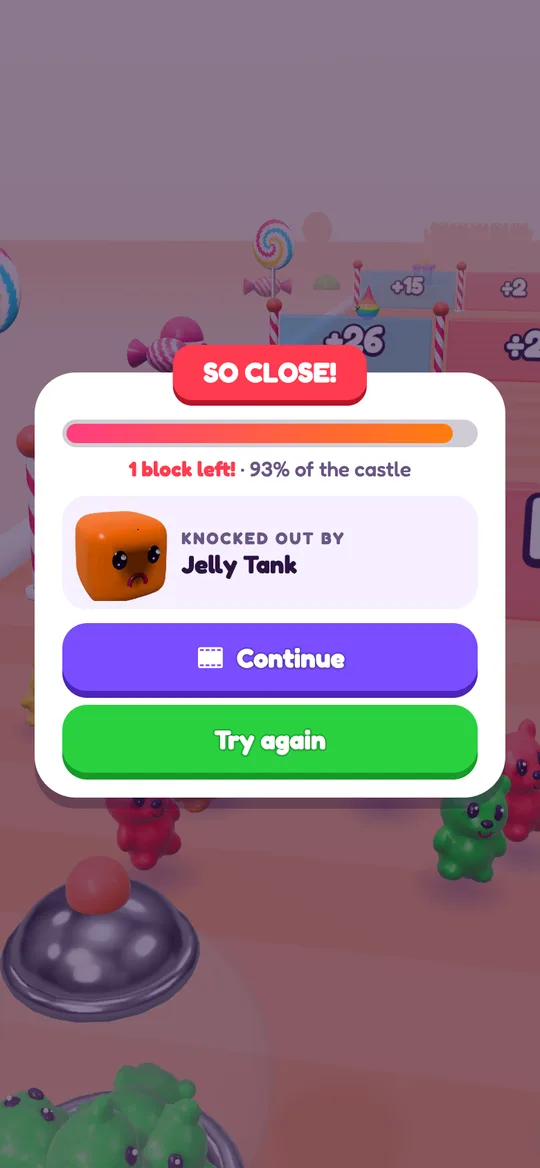
Before you tap anything, take two seconds to read the card. It has three clues.
- The ribbon. It says SO CLOSE! when you got well into the level and OH NO! when the run ended early. That alone tells you a lot.
- The castle bar. The bar fills as you roll further up the road and knock down castle blocks. Under it you see how many blocks are left and how much of the castle you reached, for example "1 block left! · 93% of the castle".
- Knocked out by. A small spinning model shows the enemy that reached your launcher: a Jelly Cube, Hopper, Jelly Tank, Gummy Worm, Jawbreaker, a Castle blob, or a boss like the Jelly King or the Mega Worm.
The last clue is the most useful one. If the same enemy beats you twice, the fix is usually about colour or crowd size, not luck.
What Continue actually does
The purple Continue button has a small film icon. It is an optional reward video: nothing plays unless you tap it, and you never have to. If the video finishes, you are back in the same run with the words BACK IN! on the road, and the game gives you a fair second chance:
- regular enemies close to your launcher are cleared away,
- a boss is pushed a little further up the road,
- your launcher gets a shield for 4 seconds,
- 30 extra bears join your stream.
There are two catches. You can only continue once per level, so the button is gone if you lose again in the same run. And a level you win after a continue gives 1 star instead of 2 or 3. Stars fill the Gummy Pass, so a continue trades a little pass progress for finishing the level now.
If you would rather not watch a video, that is completely fine. Try again costs nothing and is always there. Grown-ups who want to know more about how these videos work can read our guide on how ads work in free kids games.
What Try again does, and what you keep
The green Try again button starts the same level again from the beginning, straight away. You do not go back to the home screen and you do not lose your place on the Candy Road.
A loss is also gentler than it looks:
- You keep half of the coins you picked up during the run, so even a lost level helps you save for upgrades.
- No break ad plays after a loss. Those only ever come after a level you won.
- The game eases off a little. After two losses in a row, the next levels get slightly easier in the background. Three wins in a row nudge them back up.
The one thing you do lose is your win streak. A streak adds a bonus to the coins on your win card, and a loss sets it back to zero.
How to decide: continue, retry or upgrade
Use the card's clues and follow these steps.
- Check the ribbon and the blocks left. SO CLOSE! with only a few blocks left means the run was nearly done. A continue gives you a shield and fresh bears right where you need them.
- Check whether Continue is still there. If you already used it this level, the only button is Try again. Take it, and remember what went wrong.
- Look at who knocked you out. A Jelly Tank or Jawbreaker near the end usually means your crowd was too small or the wrong colour. A Castle blob means you were standing still under a throw. A boss means you needed more bears before the fight.
- If the run fell apart early, try again. An OH NO! ribbon with most of the castle still standing usually comes from one bad gate choice. A fresh start is better than a continue here, and it keeps the chance of 2 or 3 stars.
- If the same enemy wins twice, change something. Pick a different colour gate, aim for more add and multiply gates, or get stronger with upgrades and boosts before the next try.
Getting stronger before the next try
Try again sends you straight back into the level, so plan your upgrades around it.
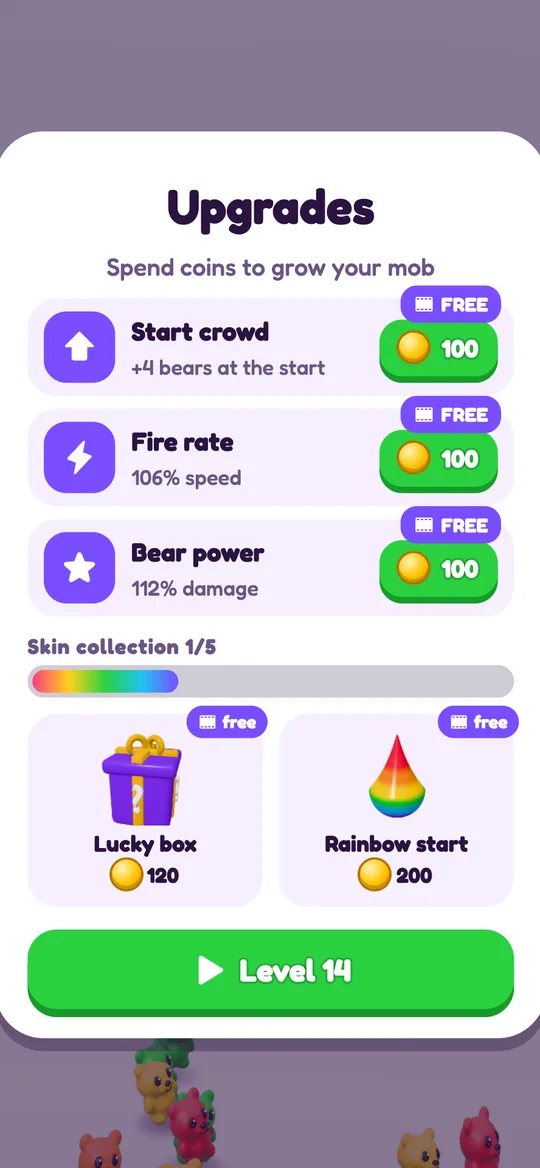
- Upgrades appear on a card after a level you win, from level 4. Start crowd, Fire rate and Bear power all cost coins, and you can take one free upgrade per visit with an optional video. The half of your coins you kept from a loss adds up here. Our upgrade order guide explains what to buy first.
- Boosts sit on the home screen from level 3, above the PLAY button: Start GIANT, +20% crowd, Lucky box and Rainbow start. To pick one after a loss, open the pause menu during the level and choose Quit level. You go back to the home screen, your level is not lost, and you can pick a boost before you press PLAY.
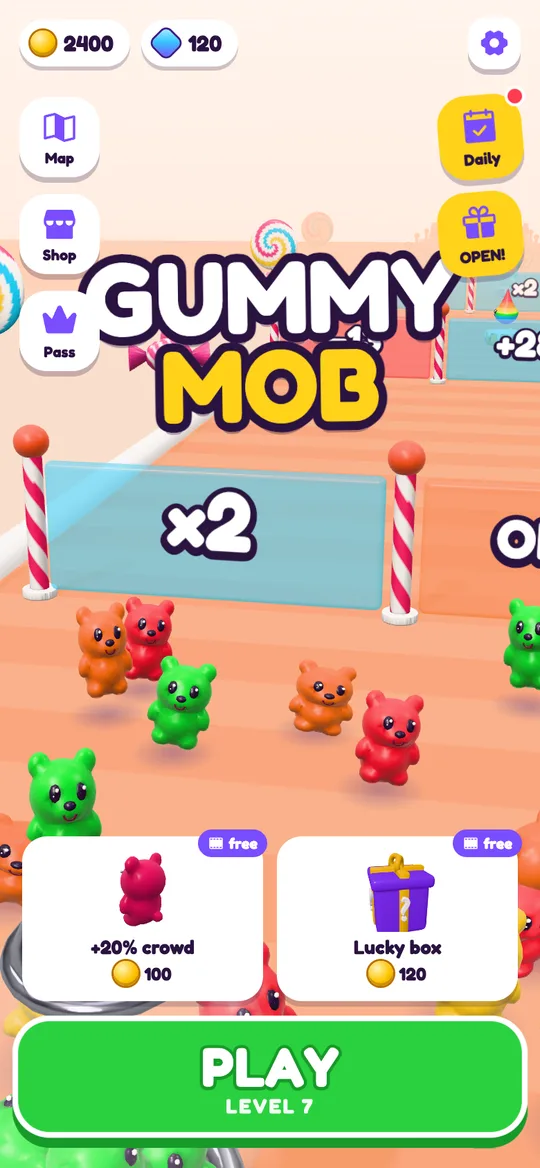
Coins can also come from the daily rewards and the free box on the home screen. For more ideas, see how to earn coins faster without paying.
Fixes for the most common knockouts
- Knocked out with one or two blocks left. You were nearly there. Our guide to clearing a castle with one block left covers the last few seconds.
- Knocked out by a Castle blob. Keep moving when you see a shadow on the road. Read how to dodge jelly blobs for the full trick.
- Knocked out by a boss. Build a bigger crowd before the fight and match the boss's colour. Hard and boss levels are explained in Gummy Mob hard levels explained.
FAQ
What does Continue do in Gummy Mob?
Continue is an optional short video. When it finishes you return to the same run with nearby enemies cleared, a 4-second shield on your launcher and 30 extra bears. You can use it once per level.
Do I lose my coins when I lose a level?
No, not all of them. You keep half of the coins you picked up during the run, and your saved coins, gems and upgrades are not touched.
Why did I only get 1 star?
A level you win after using Continue always gives 1 star. Win it without a continue to earn 2 or 3 stars for the Gummy Pass.
Can I continue more than once?
No. Continue is offered once per level. If you lose again in the same run, only Try again is left, which restarts the level for free.
Does Gummy Mob get easier if I keep losing?
Yes, a little. After two losses in a row the next levels get slightly easier, and after three wins in a row they get slightly harder again.
Do I have to watch a video after losing?
No. Videos only play if you tap Continue or another button with a film icon. Try again never shows a video, and break ads never appear after a loss.